Sources that disagree
The AODB says gate A14, the airline's own message says A16, and the belt allocation arrived from a third system. Without an explicit precedence rule, whichever wrote last wins — and it is often the wrong one.
A passenger checks four displays between the kerb and the gate. If any one of them disagrees, your contact centre finds out before you do. SE-FIDS is the control plane that keeps departures, gates, check-in, reclaim and signage consistent — driven by rules, not by someone typing into a spreadsheet at 05:00.
The problem
They fail quietly — one zone shows yesterday's gate, a player freezes on a splash screen over a holiday weekend, an airline's status update takes four minutes to reach the concourse. Nobody raises a ticket. Passengers simply stop trusting the screens and ask a person instead.
The AODB says gate A14, the airline's own message says A16, and the belt allocation arrived from a third system. Without an explicit precedence rule, whichever wrote last wins — and it is often the wrong one.
A media player behind a screen crashes, reboots into a desktop, and displays a wallpaper for eleven hours. Legacy systems have no heartbeat, so the first report comes from a passenger complaint.
Adding a language, moving a boarding call five minutes earlier, or running a seasonal campaign becomes a change request with a lead time. Operations stops asking, and the system slowly drifts away from how the terminal actually runs.
What it does
Nothing here is exotic. It is the accumulation of details that decides whether a display estate is trusted or ignored.
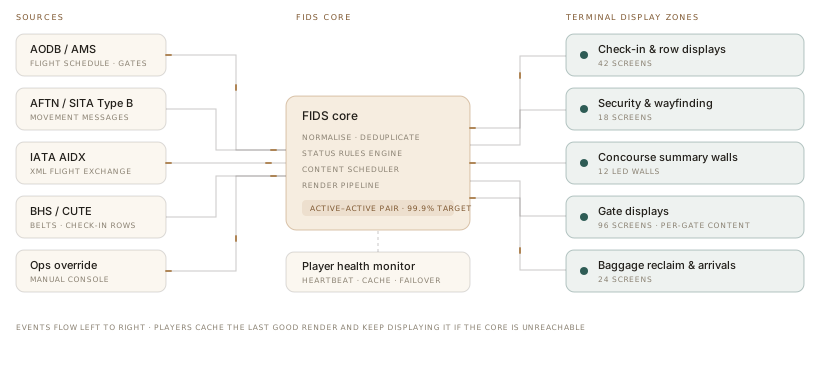
Adapters normalise AODB and AMS records, AFTN and SITA Type B movement messages, and IATA AIDX exchanges into a single flight object. Where sources conflict, an explicit precedence table decides — per field, not per message — and the losing value is retained so an investigator can see what was rejected and why.
Design position: SE-FIDS is a consumer of operational truth, not its owner. It will not become a shadow AODB, and we will push back if you ask it to.
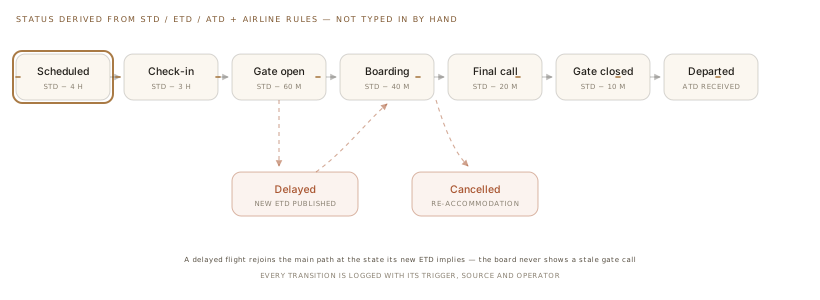
Boarding calls, gate opens and final calls are computed from scheduled, estimated and actual times, adjusted by walking distance to the gate and each carrier's own procedure. Rules are authored in the console, dry-run against a previous operating day, and promoted only once the diff is understood.
Layouts are templates, not per-screen artwork. Type is sized against viewing distance rather than pixel dimensions, and language rotation carries proper font fallback for Latin, Devanagari, Arabic right-to-left and CJK — including the line-height and column widths those scripts actually need, which is where most signage systems quietly break.
Glyph coverage of the shipped font stack. Anything below full coverage falls back to a bundled face rather than a system default, so a screen never renders a row of boxes.
Every player holds a local cache of its last good render and a rules subset, so a core outage degrades to slightly stale times rather than a blank screen. A watchdog restarts a frozen renderer, and the monitoring console pulls a real screenshot from any endpoint on demand — so "is it actually showing something?" is a question you can answer from a desk.
Role-based access lets a handling agent update their own carrier's flights and nothing else, while airport operations retains terminal-wide control. Every change is attributed, timestamped and reversible, and one action pushes an emergency message to every display in a zone or in the building.
Visual boarding calls and PA announcements are triggered from the same rule, so the screen and the announcement never contradict each other. Quiet-airport policies suppress audio while keeping the visual call, and the same content stream feeds accessible kiosks for passengers who cannot read a wall-mounted display.
Architecture
Six services, a message bus and a fleet of thin players. No component requires an internet connection to keep displays alive.
One process per source protocol. Adding a carrier feed does not touch the core.
Deterministic, versioned, dry-runnable. The only place status is decided.
Composites frames server-side so players stay thin and cheap to replace.
Runs on Android, Linux or Windows. Caches, restarts, reports and screenshots.
One system, every surface
Each surface has a different job and a different failure mode. They share one source of truth and one rule set.
The highest-traffic surface and the one passengers photograph. It must paginate predictably, never reorder rows mid-read, and hold a flight visible long enough to be found again after a glance away.
A single flight, read at two metres by someone who is anxious. Boarding group, seat rows now boarding, and the honest time — not an optimistic one. Gate displays are where a wrong status costs you a misconnection.
Driven by the common-use desk allocation rather than by the flight schedule, because a desk serves whichever carrier holds it right now. The display follows the allocation system and reverts to a neutral state the moment a desk closes.
Belt assignment comes from the baggage handling system, not the flight schedule, and it changes late. The reclaim display has to show the first-bag and last-bag signals honestly, because that is what stops passengers crowding a belt that has not started.
The same player fleet carries advertising and wayfinding, which is where non-aeronautical revenue lives. Operational content always wins: a campaign is pre-empted automatically by a boarding call or an emergency message, and the proof-of-play log records exactly what ran and what was displaced.
Specifications
If something you need is missing here, ask. We would rather tell you it is unsupported than discover it during commissioning.
Docker Compose for single-site, Kubernetes for multi-terminalInteroperability
These are protocols and system classes we have built adapters for. Naming them is a statement of interoperability, not of partnership or endorsement.
Deployment
The default for airports. Everything inside your perimeter, air-gapped if required.
Core services in your tenancy, players reaching out over TLS from the terminal.
Central control, a render node per terminal. Displays survive a WAN outage entirely.
Before you ask
The last known flight state persists and continues to render, marked with a data-age indicator once it passes a threshold you set. Rules that depend on live times stop advancing rather than guessing, and the operations console switches to manual mode so staff can drive status directly with an audit trail. Displays never blank and never invent a status.
Yes, and we recommend it. The normal pattern is parallel running for two to six weeks: we consume the same feeds, render to a subset of screens — typically one pier — and you compare the two systems on live data before moving zone by zone. Rollback is a configuration change on the player, not a re-installation.
The player keeps rendering from its local cache, including the rules subset needed to advance time-based states. After a configurable staleness threshold it displays a small data-age marker so passengers are not misled. The console alerts your team immediately; the screen keeps working.
It is not a resource allocation system and not a baggage reconciliation system. It does not decide stands, belts or desks — it consumes those decisions and renders them faithfully. If your airport lacks an allocation system, adding one is a different project and we will say so rather than growing FIDS into a shadow AODB that nobody owns.
Per display endpoint, tiered by volume, available perpetual or subscription. On a perpetual licence the software keeps running if you stop paying support — you lose updates and SLA, not your displays. Source escrow is available for on-premise deployments so a supplier failure is not an operational risk.
If you need a global vendor's procurement paperwork and a twenty-year reference list, buy one — that is a legitimate requirement and we will lose that tender. Choose us when you want the rules and templates to be yours to change, a shorter path from request to production, and engineers who will tell you when your idea is wrong.
Also in the portfolio
Send us a sample AODB extract or a day of AIDX messages and we will show you your own operating day rendered on our stack — usually within a week, at no cost.