Alarms nobody trusts
A tripwire that fires forty times a night trains your operators to ignore it. By month two the rule is disabled, and the incident it was bought for goes unseen.
Most organisations already have hundreds of cameras and almost no information. SE-VISION is a full video management system — devices, recording, failover, evidence — with a GPU analytics engine built into the core rather than sold as a licence pack on top.
The problem
They fail on the six weeks after go-live, when the alarm queue fills with wind-blown rubbish and reflections, an operator mutes the notifications, and the system quietly becomes a very expensive recorder again.
A tripwire that fires forty times a night trains your operators to ignore it. By month two the rule is disabled, and the incident it was bought for goes unseen.
Detection is priced per camera, per rule, per year. Enabling a behaviour on a new camera becomes a purchase decision, so coverage stays where the budget landed in year one.
Central analytics needs every stream at the core. Remote sites on a modest link either get nothing or get a degraded stream the model was never trained on.
What it does
The device and recording layer has to be genuinely enterprise-grade before the clever part matters. Both halves ship together.
ONVIF Profile S, G and T, RTSP and RTP transport, H.264, H.265 and MJPEG. Dual-stream by default: the high-quality stream is recorded, a low-resolution stream feeds analytics, so neither job compromises the other. When a network gap ends, edge storage on the camera is pulled back and stitched into the timeline automatically.
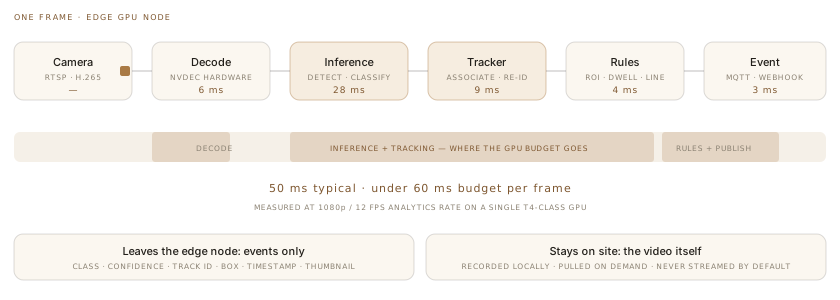
Detection, tracking and re-identification run on a GPU node next to the cameras. Only events cross the network — a class, a confidence, a track identifier, a bounding box and a thumbnail — typically a few kilobytes where a stream would be megabits. A remote site on a modest link gets the same analytics as headquarters.
Why this matters commercially: analytics is part of the platform, not a per-camera add-on. Turning a behaviour on for another fifty cameras is a configuration change, not a quotation.
Regions, tripwires, direction, dwell, occupancy and queue length are drawn on the scene by an operator, not written by an integrator. Every rule carries suppression controls — minimum persistence, size gates, schedule windows, and masks for the tree that moves in the wind — because the difference between a useful system and a muted one is entirely in these settings.
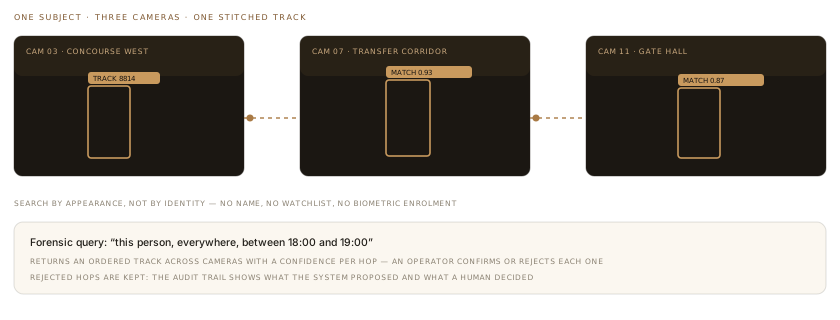
Search a time window by attribute — a person in a dark jacket, a white van, a bag left alone — and get candidate clips across every camera. Cross-camera re-identification stitches a subject's path together so an investigator follows one track instead of scrubbing eleven timelines.
Alarm queue with acknowledge, escalate and disposition codes. Map-based navigation so an operator finds the camera by where it is, not by what somebody named it in 2019. Video wall layouts driven from the same console, and a mobile client for the supervisor who is walking the floor rather than sitting at it.
Retention is set per camera, not globally, so a car park and a staff area can differ. Redaction blurs faces and plates on export by default and requires a named privilege to disable. Every export is hashed and logged with who requested it, why, and what was released.
What we do not sell: we do not ship watchlist facial recognition as a turnkey feature. Face detection for counting and redaction, yes; matching a face against an identity database is a decision with legal and ethical weight that belongs to you and your counsel, not in a default configuration.
Architecture
Recording stays close to the cameras. Analytics runs beside it. Only events and requested clips travel — which is what makes multi-site deployment affordable.
One or more per site. Add a node to add streams; no per-camera analytics licence.
Pooled, with failover recording so a host loss does not create a gap.
Indexed detections and tracks. Holds thumbnails, never the underlying video.
The only path that can export video, and the only one that can lift redaction.
What the operator sees
Drag the handle. The left side is what a recorder gives you; the right is what the analytics layer adds on top of the identical stream.
This is a rendered mock-up of the overlay, not a screenshot of a real deployment — we will not present synthetic footage as evidence of accuracy. What it shows faithfully is the information model: a class, a confidence, a persistent track identifier and a rule state, drawn over the stream the operator is already watching.
On accuracy claims: we will not quote a single accuracy figure for your site until we have run against your footage. Anyone who quotes one before that is quoting a benchmark, not your car park at dusk.
Specifications
Kubernetes or Docker Compose; Ubuntu LTS or RHEL hostsInteroperability
Protocols and system classes we have built adapters for. Naming them states interoperability, not partnership.
Deployment
One rack: recording, GPU inference and management together. Air-gapped if required.
A node per site keeps recording and analytics local; the core sees events only.
Video never leaves your sites; configuration, users and event search live in your cloud.
Before you ask
We do not know yet, and neither does anyone else quoting you a number. Accuracy depends on your camera angles, lens choice, lighting at the worst hour of the day, and what you consider a true positive. Give us a week of footage from your five hardest cameras and we will report measured precision and recall on that footage, including the cases we get wrong. That number is worth something; a datasheet figure is not.
No. We regularly run the analytics engine against an incumbent VMS's RTSP streams, so you keep your recording estate and add the intelligence layer. If you later want to consolidate, migration runs camera group by camera group with both systems recording in parallel. Both paths are supported and priced differently — we will tell you which is cheaper for your estate.
On device support, recording architecture and evidence handling we are aiming at the same class of system, and XProtect has a far longer track record and a deeper partner ecosystem. Where we differ is that analytics is in the core rather than a per-camera licence pack, rules are tuned by your operators rather than by an integrator, and you get direct access to the engineers who wrote it. If you need a global vendor's support footprint across forty countries, that is a real reason to buy XProtect.
We ship face detection — used for counting and for automatic redaction — but not watchlist matching against an identity database as a turnkey feature. Where a lawful basis genuinely exists, that becomes a scoped engagement with your data protection officer involved, not a checkbox in a configuration screen. For India's DPDP Act and for GDPR we provide deployment patterns, retention defaults and DPIA support material.
Week one is noisy — expect a false-alarm rate that would be unacceptable long term. That is the tuning period, and it is the work: persistence gates, size floors, masks and schedules against your real scenes. By week six a well-tuned perimeter rule should be producing single-digit nightly alarms. Anyone who tells you it is accurate on day one has not tuned it against your site.
It is not an access control system and not an intrusion panel. It consumes their events and correlates against video; it does not unlock doors or arm zones. It also will not make a poorly positioned camera work — if a lens is looking into the sun at 17:00, the honest fix is a bracket and a survey, and we would rather quote that than sell you a model that cannot help.
Also in the portfolio
A week of footage from the angles that defeat your current system. We will come back with measured precision and recall — including where we fail — before you commit to anything.